The Server Side Blazor and SignalR Timeout
So in my Blazor travels I ran across one (or another) annoying thing. In this one we will talk about that Server -Timeout? Disconnect? Retry? Not really sure which one it is.
This affects Blazor Server Side where SinalR is being used between the browser and server side code.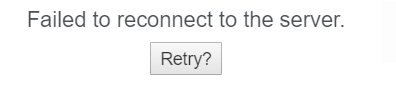
I came across some Javescript that can go into the _Host.cshtml file.
<script>
    // Wait until a 'reload' button appears
    new MutationObserver((mutations, observer) => {
        if (document.querySelector('#components-reconnect-modal h5 a')) {
            // Now every 10 seconds, see if the server appears to be back, and if so, reload
            async function attemptReload() {
                await fetch(''); // Check the server really is back
                location.reload();
            }
            observer.disconnect();
            attemptReload();
            setInterval(attemptReload, 10000);
        }
    }).observe(document.body, { childList: true, subtree: true });
</script>
Not really a solution but let’s see. The script is basic and checks the connection and reloads the page as needed.
There’s a full run down here ASP Core Issues. Another good resource is this docs page ASP.NET Core SignalR configuration.
Happy Blazor-ing!
~ScottGeek
You May Also Like
Did you say Free Pipelines?

.net Core 2.1 and SQL via EF Core 2.1 -The revisit